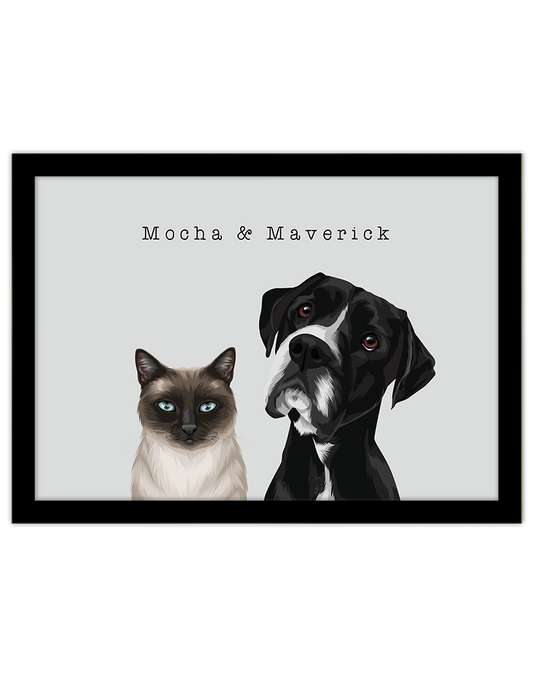

You have chosen the gift. Now comes the surprisingly difficult part: finding the right photograph.
There is the family photo where everyone looks happy, but one face is slightly blurred. The beautiful picture of your dog at the beach, where you can barely see their eyes. And the older photograph that means everything, even though it is far from perfect.
The best photo for a personalised Christmas gift combines a meaningful moment with enough clear detail to guide the artwork. Start with the expression or memory you love, then check the lighting, focus and visible features.
Here is how to choose a useful reference for a pet, family, house or vehicle portrait, and what to do when your favourite image is the only one you have.
What makes a good photo for a personalised portrait?
A useful reference photograph should:
- Show clear details: faces, markings or other important features are easy to see.
- Have suitable lighting: the subject is visible without deep shadows or bright areas hiding detail.
- Show the intended view: the pose and camera angle suit the portrait you want.
- Include the necessary features: important parts are not hidden or cropped out.
- Feel personal: the expression, subject or moment means something to the recipient.
You do not need a professional camera. A clear phone photograph can be a useful reference, particularly when you have the original file.
Choose the portrait style before choosing the final photo
Look at the product examples first. A close-up pet portrait needs a clear view of the face, while a full-length family illustration needs useful references for clothing, bodies and feet.
For a house portrait, the building and its distinctive features matter. For a car portrait, the photograph needs to show the vehicle from the angle you would like represented.
Choosing the style first helps you judge whether your photograph contains the right information, rather than simply whether it is a lovely photo.
How to compare your favourite photographs
Shortlist two or three images, then open each one at a larger size. Look closely at the subject rather than the overall scene.
For example, a beach photograph might hold a wonderful memory but show very little of your dog’s face. A simpler photograph beside a window may reveal their expression and markings much more clearly.
For a close-up portrait, the window photograph may be the better main reference. You can still explain why the beach memory matters and ask whether another reference would help.
If one photo has the expression you love and another shows clearer detail, identify which should guide the main pose. Confirm how additional references can be used before ordering.
1. Check focus and visible detail
Look at the areas that make the subject recognisable. For people, check facial features and expressions. For pets, look at the eyes, nose, ears and distinctive markings.
A large image file is not automatically a clear photograph. Motion blur can hide details, and a person standing far away in a group photo may remain difficult to see when enlarged.
If the important features look soft, try another photograph. If the image is irreplaceable, ask for advice before assuming it cannot be used.
2. Choose light that shows natural colours
Soft daylight is a useful starting point. Try a bright room near a window or an outdoor spot in open shade.
Check that light reaches the subject’s face. A bright window behind them can leave the features in shadow, even when the room itself looks light.
Watch for:
- Strong shadows hiding part of a face.
- Bright sunlight washing out pale fur or skin detail.
- Dark fur blending into the background.
- Coloured lighting or filters changing the subject’s appearance.
Keep an unfiltered version available. Accurate reference colours are more useful than a dramatic editing effect.

3. Find the original file
Use the original photograph where possible. Screenshots, social media downloads and compressed copies may contain less detail than the camera file.
If a relative took the picture, ask for the original image rather than a screenshot. When sharing it, choose an option that preserves its quality.
Avoid cropping the file tightly before uploading unless the product instructions request it. Useful details can be lost when an image is cropped or repeatedly saved.
There is no single file size that guarantees suitability. The clarity of the subject matters as well as the image dimensions.
Choosing a photo for a pet portrait
For a personalised pet portrait, look for the expression their owner knows best: the gentle head tilt, curious look or familiar relaxed face.
For many portrait styles, a photograph taken near the pet’s eye level is a helpful starting point.
- Include the ears and full head if you want them shown.
- Keep important markings visible.
- Check that hands, toys or another animal are not covering the face.
- Choose a pose that suits the selected artwork style.
Your pet does not always need to look directly at the camera. A profile or relaxed pose may be suitable when it matches the intended portrait. Ask if you are unsure.
Take a clearer pet photograph at home
- Clean your phone’s camera lens.
- Choose a bright spot with soft, even light.
- Get down near your pet’s eye level.
- Leave space around their head and tap the face to focus.
- Take several photographs while they are comfortable.
- Check the results at a larger size before selecting one.
A favourite toy near the camera may help attract attention. Keep the session short and take a break if your pet loses interest.
Choosing a photo for a family or couple portrait
For a custom family portrait, check every person individually. A group photo can look lovely overall while one face is blurred or partly hidden.
Choose expressions the recipient would enjoy seeing displayed, and make sure everyone intended for the portrait is clearly visible.
For full-length artwork, include the necessary body and clothing details. If feet, hands or part of an outfit are missing, ask whether the photograph suits the selected style.
Want to include people or pets from separate photographs? Confirm the arrangement before purchasing. Different angles and lighting may affect what can be achieved.
If you are still deciding on the gift itself, explore our guide to Christmas gifts for families who say they don’t need anything.

Choosing a photo for a house portrait
A personalised house portrait needs a clear view of the home and the details you want remembered.
Step back far enough to include the roofline, entrance and relevant garden or driveway features. Keep the camera reasonably level rather than pointing sharply upwards from close to the building.
Check whether trees, parked cars or fences hide important features. An additional photograph may help explain an obscured detail.
If you would like something removed or an older version of the home represented, confirm the request and provide suitable references before ordering.
Choosing a photo for a car or bike portrait
For a custom car or bike portrait, choose an angle that shows the vehicle the way its owner would like to remember it.
A three-quarter view shows the front and side, while a side-on photograph highlights the profile. Include the complete vehicle and check that reflections do not hide important details.
If a badge, modification or other feature matters, provide a clear additional reference and explain which photograph should guide the main composition.
What if the photograph is old or irreplaceable?
Sometimes taking another photograph is not possible. You may be remembering a pet who has passed away, a relative or a childhood home.
Send the best available version and explain what matters most. A technically imperfect photograph can still hold valuable reference information.
If you have a physical print, scan it where possible. Alternatively, photograph it in even light, keeping your camera parallel to the print and avoiding glare.
Keep an unedited copy. Strong sharpening or AI enhancement can introduce details or change facial features and markings.
For a pet memorial portrait, ask for a suitability assessment before ordering if you are uncertain about the image. The team can explain any limitations without you having to guess.
Write a useful note with your photograph
A short, specific note helps explain your priorities.
“Please use photo one for the pose and expression. Photo two shows the white chest marking more clearly. Please confirm whether both references are suitable.”
For a family portrait, identify who should be included and mention any details that are particularly important.
Check names, dates and requested wording separately. Even the clearest photograph cannot prevent a spelling mistake in the order details.

Your checklist before uploading
- The photograph suits the selected portrait style.
- Important faces and features are clear when viewed closely.
- Lighting shows useful detail and natural colours.
- The parts I want included are visible.
- I have the original image where available.
- I have avoided unnecessary cropping and heavy editing.
- I have explained additional references and special requests.
- Names and other personalisation are correct.
If something is uncertain, contact Oh Barney before ordering. Check the selected product’s upload instructions and artwork review options, too.
Allow time before Christmas
Finding an original file or asking a family member for another photograph can take time. Start choosing your reference before you reach the ordering deadline.
Check current shipping information and any published Christmas cut-offs. Artwork creation, any included review steps, printing and delivery all need to be considered.
Digital portraits also require preparation. They should not be treated as instant downloads.
For interstate gifts, read our guide to Christmas gifts you can send across Australia.
Frequently asked questions
Can I use a phone photo for a personalised portrait?
Yes. A clear phone photograph can be a useful reference. Check focus, lighting and visible features, and send the original image where possible.
Does the photograph need a plain background?
Not necessarily. Depending on the portrait style, the background may be simplified or replaced. Clear subject details are more important than a tidy room. Confirm any specific request before ordering.
Can I use a screenshot?
Look for the original photograph first, as it may contain more detail. If a screenshot is the only version available, ask whether it is suitable before purchasing.
Can several photographs be used for one portrait?
Ask about the selected product and intended arrangement before ordering. The number of subjects, their visibility and the camera angles can affect what is possible.
What if my favourite photograph is slightly blurry?
Compare it with other available images and ask for advice. Suitability depends on which details remain visible, the intended style and the limitations of the reference.
Can I change the reference after artwork has started?
Check before requesting a replacement. A new photograph may require the artwork to be restarted and can involve an additional charge.
Choose the details you want to remember
The right photograph does not need to look like a studio shoot. It needs to show the features that make the subject recognisable and the expression or memory you want to keep.
Compare your favourites, find the best available file and ask about anything uncertain. Then choose a portrait that suits both the photograph and the person receiving it.
Explore Oh Barney’s pet portraits, people portraits and house portraits to get started.